1010DATA Announcements

April 1, 2025

Bienvenido a los NUEVOS Dashboards

Filed under: Uncategorized — Tags: — Jesus Monter @ 11:50 am

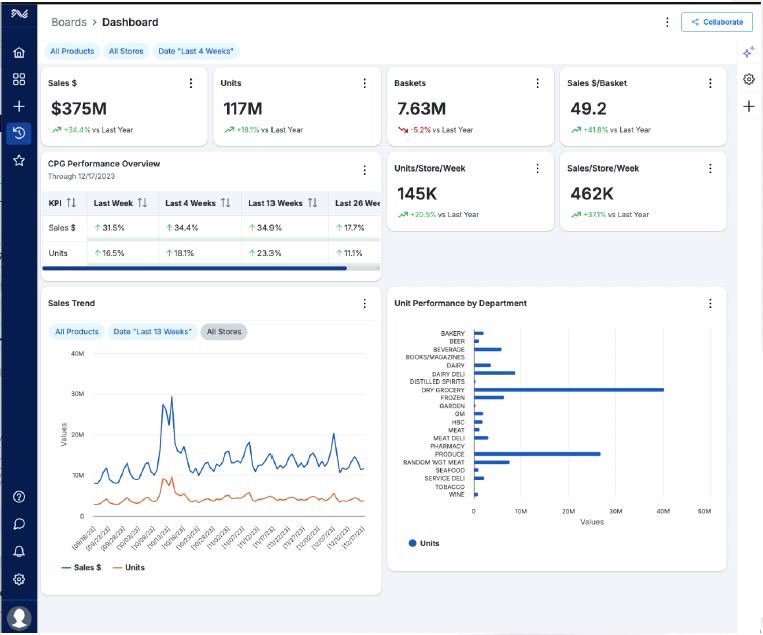
La integración de Dashboards y Copilot en el entorno MADRiD, incluyendo soluciones de inteligencia artificial y generación de IA, transformará la forma en que trabajas al brindarte:

  • Mayor flexibilidad más allá de las jerarquías de los retailers (selección personalizada de PGR, compradores y tiendas).
  • Interfaz personalizable (crea tus propios dashboards personalizados que se actualizan automáticamente con la información más reciente).
  • Fuente de datos integrada para personalizar métricas y visualizaciones (accede a ventas, promociones, clientes, etc., en un solo lugar).

Toma de decisiones más rápida con IA generativa.

Terminología Clave

  • Boards – Cada Board está compuesto por Widgets que funcionan como visualizaciones de negocio individuales dentro del dashboard. Configura el Board según tus necesidades: alcance, widgets, nombres, diseño y más.
  • Widgets – Son las visualizaciones de negocio individuales que conforman un Board. Los Widgets heredan el alcance del Board, pero también pueden tener su propio alcance independiente. Puedes seleccionar los atributos y métricas de cada Widget. Los Widgets disponibles dependen de tu contrato de licencia actual.
  • Scope (Alcance) – Parámetros de datos para un Board o Widget. Estos incluyen dimensiones como Producto, Tienda, Tiempo, Canal y Cliente. Se puede establecer un alcance predeterminado para todos los Boards y ajustar el alcance de cada Board y Widget según sea necesario.

Boards y Widget

Un Board está compuesto por Widgets. Los Widgets son visualizaciones de datos individuales que se muestran dentro del Board. La selección del alcance para los Boards y Widgets puede configurarse de manera única según tus necesidades específicas.

Nota: Si no realizas modificaciones, el alcance del Widget se ajustará automáticamente al alcance del Board.

  1. Primero, crea un Board (nuevo o copia uno existente) y establece su alcance.
  2. Luego, agrega Widgets al Board y ajusta la agrupación, las métricas y el tamaño, si lo deseas.

Biblioteca de Boards

Haz clic en la opción Boards en el menú de navegación a la izquierda para abrir la pantalla de la Biblioteca de Boards. Desde aquí, puedes:

  • Ver y acceder a tus Boards.
  • Acceder a Boards compartidos contigo.
  • Usar Boards de plantilla.
  • Marcar Boards como favoritos.
  • Eliminar y copiar Boards existentes.
March 26, 2025

🌟 ¡Presentamos los Nuevos Dashboards!

Filed under: Announcements,Uncategorized — Tags: — Diego Martinez @ 6:55 pm

Nuestra última actualización de Dashboards ha llegado, ofreciendo potentes visualizaciones, automatización sin interrupciones e inteligencia artificial avanzada para transformar la forma en que gestionas y controlas tu negocio.

🚀 ¿Qué hay de nuevo?


Dashboards Inteligentes – Información en tiempo real con exploración interactiva
Inteligencia Visual Avanzada – Datos de alta granularidad simplificados e impactantes
Copilot Enfocado en Retail – Análisis impulsado por IA y recomendaciones proactivas
Retail Conectado en su Máxima Expresión – IA integrada para una claridad y resultados inigualables

🚀 ¡Desbloquea el Futuro del Retail con Copilot Potenciado por IA!

Copilot identifica tendencias y oportunidades clave antes de que se pierdan. Sus recomendaciones impulsadas por IA aceleran la transformación de datos en acciones de manera sencilla.

¡Y esto es solo el comienzo! Próximas actualizaciones incluirán:


🌎 Soporte en idioma español
📊 Visualizaciones aún más avanzadas
🤖 Funcionalidad mejorada de IA en Copilot

📩 ¡Queremos tu opinión! Comparte tus comentarios y sugerencias enviándonos un correo a support@1010data.com.

December 17, 2024

Platform Version Update: Version 20

On January 15th 2024, 1010data Insights Platform Version 20 is scheduled to be released, which includes performance improvements, GUI enhancements, and AI-powered Copilot capability. Learn more: Version 20 Release Notes

  • Please note that we still recommend logging into your default platform version – There is no change to how you should log into 1010data. Consumer Insights Platform has not yet been updated for use with version 20; when this occurs, client environments will be updated automatically, and a separate announcement will be sent.
  • Your custom queries and applications using /prime-latest may not work in version 20 until they are adapted for the new version. If you encounter issues, please return to your current version by clicking Session > Log Out, then log in as you usually do.
  • We are eager for your feedback on the Insights Platform. Please contact Customer Support to share your thoughts about the new version.

November 19, 2024

Now Available – Inventory at Cost Metrics

Inventory at Cost metrics are now available in all CIP reports that include inventory data. The metrics are available for Stores, DC, and Total (Store+DC) Inventory and for the beginning and end of period. Please reach out to support@1010data.com with any questions.

November 11, 2024

Como activar los reportes agendados

Filed under: Uncategorized — Tags: , , , , — Jesus Monter @ 11:47 am
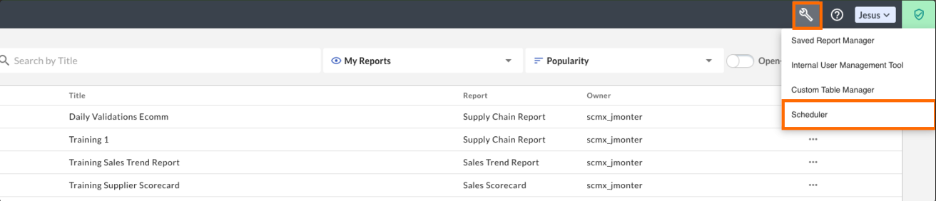
  1. En la pantalla de inicio haz clic en Herramientas > Scheduler

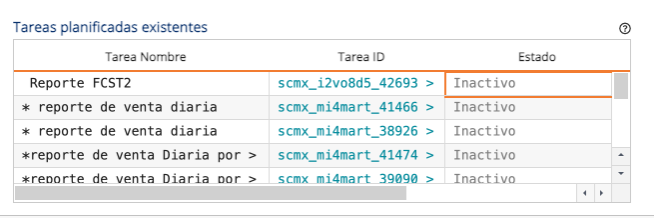
    2. Dentro de el cuadro de Tareas planificadas existentes busca el reporte que quieres activar, haz clic en Inactivo para cambiar el estatus a activo.

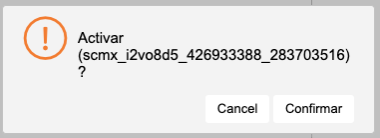
    3. Confirme en la ventanilla que desea activar el reporte.

    4. El reporte ahora se encuentra activado y se ejecutara en la fecha y hora que anteriormente estaba planificado.

    November 7, 2024

    Fuel Rewards Reporting Update

    Filed under: Uncategorized — Tags: , , — Sonia Hooper @ 6:59 pm

    Dear Users,

    1010data & Shell are pleased to announce the release of new enhancements to “Fuel Rewards Reporting”, including:

    – Adding the Wholesaler name field and Halo Metrics to the Overall Business Performance Report

    – Introducing a new feature to control column visibility in the Overall Business Performance Report. The new “Include Transactions” checkbox allows users to show or hide transaction count columns

    – Adding Wholesaler reference data to all reporting exports, where it is applicable, in Excel and CSV formats

    – Reordering of reporting tabs to improve loading speeds

    Please get in touch with our Customer Support team at support@1010data.com if you have any questions.

    September 26, 2024

    Now Available – CIP and Platform Enhancements

    Filed under: Uncategorized — Tags: , — Molly Braun @ 7:17 pm
    • New metrics are available in the Basket Combination Report, Cross Purchase Matrix, and Quick Facts Scorecard.
    • Other CIP Enhancements include updated Affinity by Basket logic, tooltips for metric definitions and new summarization options.
    • Platform Enhancements include improved Object Manager search and the ability to rename cross tabulation columns.

    For more details, please refer to the detailed Release Notes.

    Now Available – CIP and Platform Enhancements

    Filed under: Uncategorized — Tags: , , — Molly Braun @ 6:46 pm
    • New metrics are available in the Basket Combination Report (Supplier Access: Gold tier and above), Cross Purchase Matrix (Supplier Access: Gold tier and above), and Quick Facts Scorecard (Supplier Access: all tiers).
    • Other CIP Enhancements include updated Affinity by Basket logic (Supplier Access: Silver tier and above, tooltips for metric definitions (Supplier Access: all tiers) and new summarization options (Supplier Access: all tiers).
    • Platform Enhancements include improved Object Manager search and the ability to rename cross tabulation columns.

    For more details, please refer to the detailed Release Notes.

    August 29, 2024

    Inventory Update

    Filed under: Uncategorized — Tags: , , — Molly Braun @ 9:28 am

    On August 29, 2024, the store and DC inventory table logic will be updated. This change will exclude inactive records. This will result in the removal of unhelpful records from reporting and will increase the speed of inventory reports. If you have any questions, please contact support@1010data.com.

    March 1, 2024

    Now Available – New Launcher and Multi Time Period

    With the New Launcher, users can more quickly navigate to reports and applications. To learn more about the Launcher, see the Launcher User’s Guide and Launcher Webinar.

    Multi-Time Period Reporting allows users to perform analysis across multiple time periods in the same report. For more details, please see the Release Notes.

    « Newer PostsOlder Posts »

    Powered by 1010data