1010DATA Announcements

April 16, 2025

Welcome to NEW Dashboards

Filed under: Uncategorized — Tags: — Molly Braun @ 2:37 pm

The integration of Dashboards and Copilot into the CIP environment, including artificial intelligence and generative AI solutions, will transform the way you work by providing:

  • Extensive flexibility beyond retailer hierarchies (Custom Product and Custom Store hierarchies)
  • Composable UI (build your own custom dashboards that refresh with the latest data automatically)
  • Integrated source to customize metrics and visualizations (access sales, inventory, etc. in a single place)
  • Faster decision making with generative AI

Key Terminology

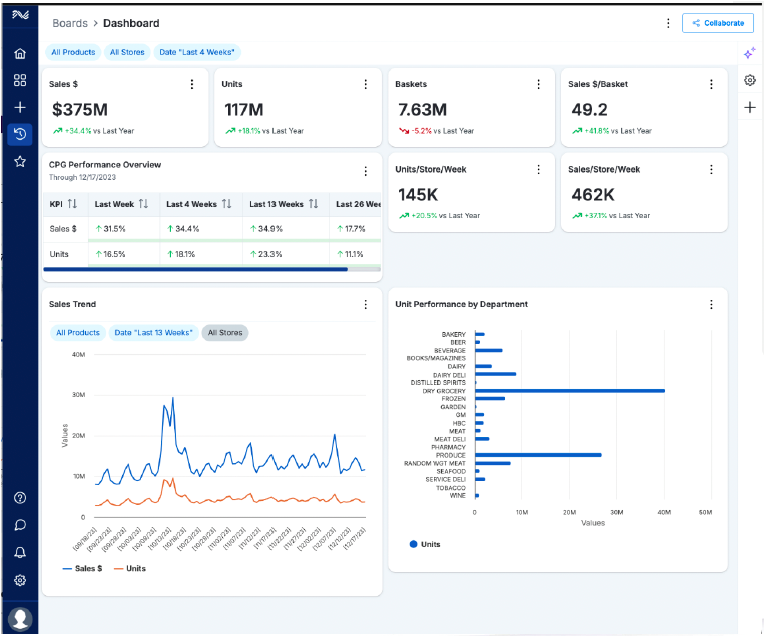
  • Boards –  Each board is made up of Widgets that function as individual Business Visualizations within the dashboard. Configure the Board to meet your needs: the Scope, Widgets, names, layout, and more!
  • Widgets –  The individual Business Visualizations that make up a Board. Widgets inherit the Scope of the Board, and can have their own Scope, independent of the Board Scope. Select the attributes and metrics for each Widget.
  • Scope – data parameters for a Board or Widget. These include dimensions such as Product, Store, and Date. A default scope can be set for all boards and the scope of each board and widget can be adjusted.

Boards and Widgets

A Board is made up of Widgets. The Widgets are individual Data Visualizations that display within the Board. Scope selection for both Boards and Widgets can be uniquely configured to meet your specific needs. Note: Widget Scope defaults to the Board Scope if no adjustments are made.

First, create a Board (new or copy existing) and set its Scope, then add Widgets to the Board and adjust the Group By, Metrics, and Size, if desired.

Board Library

Click the Boards option in the navigation menu on the left to open the Board Library screen. From here, view and access your Boards, Boards shared with you, template Boards, and favorite Boards. Delete and copy existing Boards from here as well.
Welcome to NEW Dashboards

Filed under: Uncategorized — Tags: — Molly Braun @ 2:36 pm

Our new Dashboard Solution is here—bringing powerful visualization, seamless automation, and intelligent AI-driven insights to transform the way you command and control your business.

🚀 What’s New?
Intelligent Dashboards – Real-time insights with interactive exploration
Advanced Visual Intelligence – High-granularity data made simple & impactful
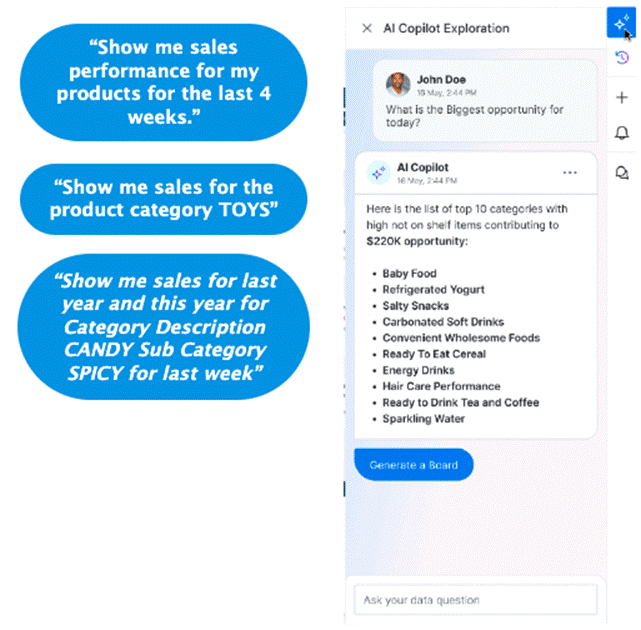
Retail-Focused CoPilot – AI-powered analysis & proactive recommendations
Connected Retail at Its Best – Integrated AI for unmatched clarity & outcomes

📊 Customize, Analyze, and Visualize Like Never Before

  • Tailor dashboards to your needs
  • Identify trends with high-granularity data
  • Transform complex insights into powerful visual intelligence

🚀 Unlock the Future of Retail with AI-powered CoPilot!

  • Copilot pinpoints critical trends and opportunities before they’re missed. AI-driven recommendations help accelerate insight to action effortlessly

This is just the beginning! Future updates will include:

📊 More advanced visualizations

🤖 Enhanced AI Copilot functionality

📩 We’d love your feedback! Share your thoughts and suggestions by emailing us at support@1010data.com

April 15, 2025

Testing Pop-up for Internal

Filed under: Uncategorized — Tags: — Diego Martinez @ 11:42 am

April 11, 2025

¡Explora los Datos con Visualizaciones!

Filed under: Uncategorized — Tags: — Diego Martinez @ 12:02 pm

¡Descubra las tendencias de ventas con gráficos interactivos e impactantes! 📊✨

Guía de Uso (Español): Enlace

Los nuevos Dashboards ya están disponibles para transformar sus datos en información clara y valiosa. Use estos tableros inteligentes para:

Dashboards Inteligentes – Información en tiempo real con exploración interactiva
Inteligencia Visual Avanzada – Datos de alta granularidad simplificados e impactantes
Copilot Enfocado en Retail – Análisis impulsado por IA y recomendaciones proactivas
Retail Conectado en su Máxima Expresión – IA integrada para una claridad y resultados inigualables

¡Visualice, explore y tome decisiones más rápido que nunca!

Guía de Uso (Español): Enlace

April 1, 2025

Bienvenido a los NUEVOS Dashboards

Filed under: Uncategorized — Tags: — Jesus Monter @ 11:50 am

La integración de Dashboards y Copilot en el entorno MADRiD, incluyendo soluciones de inteligencia artificial y generación de IA, transformará la forma en que trabajas al brindarte:

  • Mayor flexibilidad más allá de las jerarquías de los retailers (selección personalizada de PGR, compradores y tiendas).
  • Interfaz personalizable (crea tus propios dashboards personalizados que se actualizan automáticamente con la información más reciente).
  • Fuente de datos integrada para personalizar métricas y visualizaciones (accede a ventas, promociones, clientes, etc., en un solo lugar).

Toma de decisiones más rápida con IA generativa.

Terminología Clave

  • Boards – Cada Board está compuesto por Widgets que funcionan como visualizaciones de negocio individuales dentro del dashboard. Configura el Board según tus necesidades: alcance, widgets, nombres, diseño y más.
  • Widgets – Son las visualizaciones de negocio individuales que conforman un Board. Los Widgets heredan el alcance del Board, pero también pueden tener su propio alcance independiente. Puedes seleccionar los atributos y métricas de cada Widget. Los Widgets disponibles dependen de tu contrato de licencia actual.
  • Scope (Alcance) – Parámetros de datos para un Board o Widget. Estos incluyen dimensiones como Producto, Tienda, Tiempo, Canal y Cliente. Se puede establecer un alcance predeterminado para todos los Boards y ajustar el alcance de cada Board y Widget según sea necesario.

Boards y Widget

Un Board está compuesto por Widgets. Los Widgets son visualizaciones de datos individuales que se muestran dentro del Board. La selección del alcance para los Boards y Widgets puede configurarse de manera única según tus necesidades específicas.

Nota: Si no realizas modificaciones, el alcance del Widget se ajustará automáticamente al alcance del Board.

  1. Primero, crea un Board (nuevo o copia uno existente) y establece su alcance.
  2. Luego, agrega Widgets al Board y ajusta la agrupación, las métricas y el tamaño, si lo deseas.

Biblioteca de Boards

Haz clic en la opción Boards en el menú de navegación a la izquierda para abrir la pantalla de la Biblioteca de Boards. Desde aquí, puedes:

  • Ver y acceder a tus Boards.
  • Acceder a Boards compartidos contigo.
  • Usar Boards de plantilla.
  • Marcar Boards como favoritos.
  • Eliminar y copiar Boards existentes.

Powered by 1010data