Inventory at Cost metrics are now available in all CIP reports that include inventory data. The metrics are available for Stores, DC, and Total (Store+DC) Inventory and for the beginning and end of period. Please reach out to support@1010data.com with any questions.
November 19, 2024
November 11, 2024
Como activar los reportes agendados
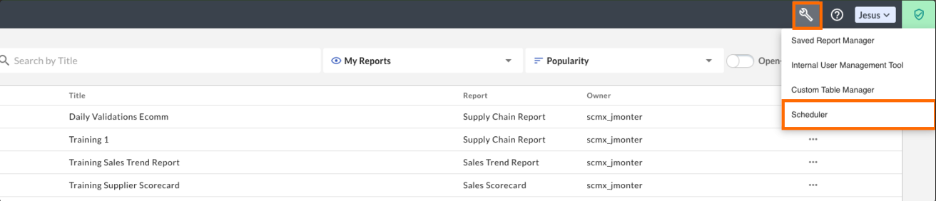
- En la pantalla de inicio haz clic en Herramientas > Scheduler
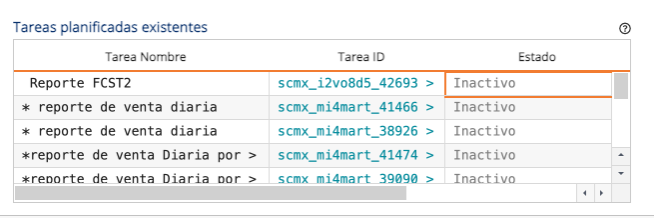
2. Dentro de el cuadro de Tareas planificadas existentes busca el reporte que quieres activar, haz clic en Inactivo para cambiar el estatus a activo.
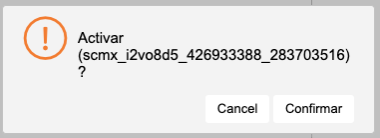
3. Confirme en la ventanilla que desea activar el reporte.
4. El reporte ahora se encuentra activado y se ejecutara en la fecha y hora que anteriormente estaba planificado.
Comments Off on Como activar los reportes agendados
November 7, 2024
Fuel Rewards Reporting Update
Dear Users,
1010data & Shell are pleased to announce the release of new enhancements to “Fuel Rewards Reporting”, including:
– Adding the Wholesaler name field and Halo Metrics to the Overall Business Performance Report
– Introducing a new feature to control column visibility in the Overall Business Performance Report. The new “Include Transactions” checkbox allows users to show or hide transaction count columns
– Adding Wholesaler reference data to all reporting exports, where it is applicable, in Excel and CSV formats
– Reordering of reporting tabs to improve loading speeds
Please get in touch with our Customer Support team at support@1010data.com if you have any questions.
Comments Off on Fuel Rewards Reporting Update